Want to play music bingo on an iPad? Wasingo turns the tablet into a complete host, a large, easy-to-read board right on the iPad (or AirPlayed to your TV), real song clips, and a unique card on every guest's phone with wins verified automatically. It's ideal when you want a shared screen without wiring up a television.
Why the iPad makes a great music bingo board
Most hosts reach for a TV to show the board, but not every room has one handy, and casting isn't always simple. An iPad solves that instantly: it's a big, bright, self-contained screen you can put anywhere. Prop it on a stand at a dinner table, a classroom desk, or a care-home common room, and the whole group can see the game unfold.
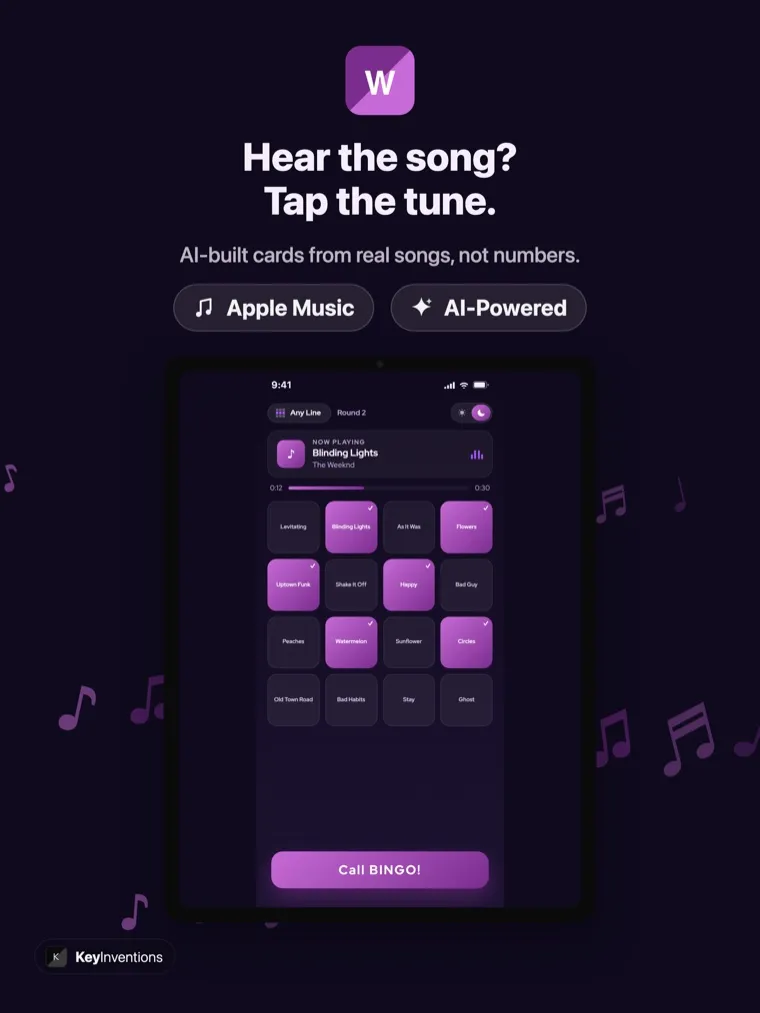
The iPad's large display is the shared screen. It shows the join code, the current song, and the full song list, set it in the middle of the room and you're hosting.
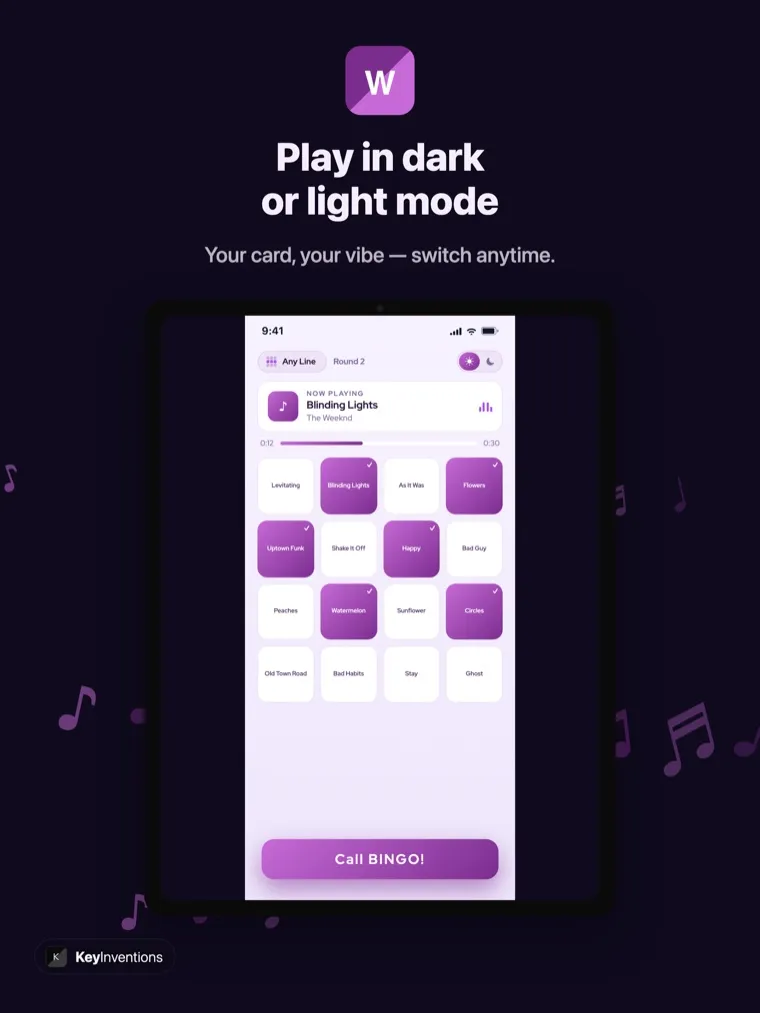
Switch to a high-contrast light board for bright rooms and older eyes, or dark for a party mood. Big type keeps song titles legible from across a table.
Hosting a bigger crowd? Mirror the iPad to your TV in one tap and get the board on the wall while you keep the controls on the tablet.
Build a card deck from real songs, pick a theme or search your own. Clips play right from the iPad's speakers, no extra gear required.
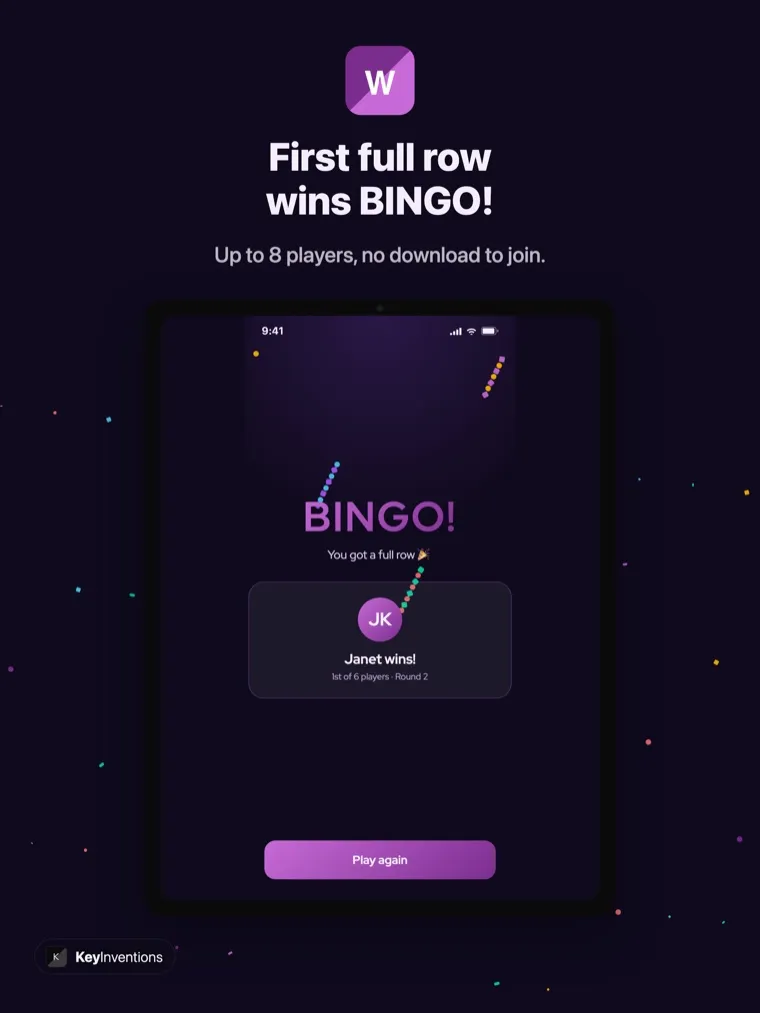
Every card is tracked live, so the first valid bingo is announced on the iPad the moment it happens, no manual checking.
Players without a phone can gather around the shared iPad or use a printed card. The big board and clear songs make it welcoming for every age.
See music bingo on iPad
Here's Wasingo on iPad, a live card mid-game, the light-mode board for bright rooms, and the winning moment when a full row lands.
How to host music bingo on your iPad
Set-up is quick, and you don't need any extra equipment.
- Download Wasingo on your iPadGet the free universal app from the App Store and sign in with Apple, Google, or email.
- Build your playlistChoose a theme or search real songs, then pick your card size and winning pattern, a line, four corners, or a full blackout.
- Stand the iPad where everyone can seeProp it on a stand or lean it against something sturdy in the middle of the room. The board fills the screen. Want it even bigger? AirPlay to your TV.
- Players join from their phonesGuests scan the QR code on the iPad or enter the 4-letter room code, no app, no account, on any phone.
- Play, and let the iPad call the winsStart the music. Clips shuffle, players mark their cards, and Wasingo announces each bingo on the big screen for you.
Perfect for classrooms, care homes, and family tables
Because the iPad is a portable shared screen, it fits places a TV can't. Teachers use it for a classroom music bingo round without booking the projector. Activity coordinators love it for music bingo with seniors, the light-mode board is easy on the eyes, and residents without a phone can watch the shared screen. At home it's a natural centerpiece for family game night, sitting right on the table where the snacks are.
One app for iPhone and iPad
Wasingo is a universal app: a single free download runs on iPhone and iPad and syncs through your Apple account, so you can build a playlist on your phone and host from the tablet. Many hosts run controls from an iPhone while the iPad sits as the board, the best of both. If your main device is a phone, see our guides to the iPhone app and the Android app.
iPad compatibility & requirements
| Requirement | Details |
|---|---|
| Operating system | iPadOS 15.0 or later |
| Devices | iPad, iPad mini, iPad Air, iPad Pro |
| Board display | On the iPad itself, or AirPlay to any AirPlay 2-compatible smart TV |
| Music | Apple Music for full playback; free Apple preview clips otherwise |
| Host sign-in | Sign in with Apple, Google, or email |
| Players | Join free from any phone, no download, no account |
| Price | Free to download and host; Pro $4.99/month for unlimited hosting |
Free to start, Pro when you're ready
Wasingo is free to download and free to host your first game nights on iPad, no ads, and players always play free. Hosting often? Wasingo Pro adds unlimited hosting and advanced options for $4.99/month. See the details on our pricing page, or read why hosts call it the best music bingo app.
Download music bingo for iPad
Grab Wasingo from the App Store, build a playlist, stand your iPad up as the board, and let everyone join with a tap. For more, see how to play, browse themes, or explore ideas for parties and music bingo night.
Frequently asked questions
Can I use my iPad as the music bingo board without a TV?
Yes. The iPad's large screen makes an excellent standalone board. Stand the iPad up where everyone can see it, and it shows the QR join code, the now-playing song, and the song list, no TV or casting required. For a bigger room, you can still AirPlay the board to your TV.
Is Wasingo a separate app for iPad?
No, Wasingo is a universal app, so one free download from the App Store runs on both iPhone and iPad and syncs with your Apple account. On iPad the board and song list simply scale up to fill the larger display.
Which iPads does Wasingo support?
Wasingo runs on any iPad with iPadOS 15.0 or later, including iPad, iPad mini, iPad Air, and iPad Pro. The larger the screen, the more comfortable the board is to read from across a room.
Why is an iPad good for music bingo with seniors or kids?
The iPad's big, high-contrast board is easy to read, and you can switch to light mode for extra clarity. Players who don't have a phone can follow along on the shared iPad or use a printed card, which makes it a great fit for senior groups, classrooms, and family game nights.
Do players need an iPad too?
No. Only the host uses the iPad. Guests join from whatever phone they already have, iPhone or Android, by scanning the QR code or entering the room code. There's nothing for them to download.